
What do I need to start developing a software application?
So, you have a rough idea for an app to address some problem in your business - what next? Getting started on any software project can often be overwhelming, so it is crucial to be equipped with the right artefacts prior to building your application.
As we explored in our article on Why is scoping important?, this is an essential process towards fully exploring your problem before proposing a viable solution. Only then will you have a clear understanding of how your end product should look, in addition to a comprehensive plan to ensure your project stays on track during the development lifecycle. What then are some of the most important artefacts to be generated as part of the scoping process?
1. A backlog of requirements
What is a product backlog? is ultimately a representation of what needs to be built as part of your solution, enabling shared understanding among the product team involved. Typically, these are divided into epics and user stories, otherwise representing high-level themes and fine-grained requirements respectively.
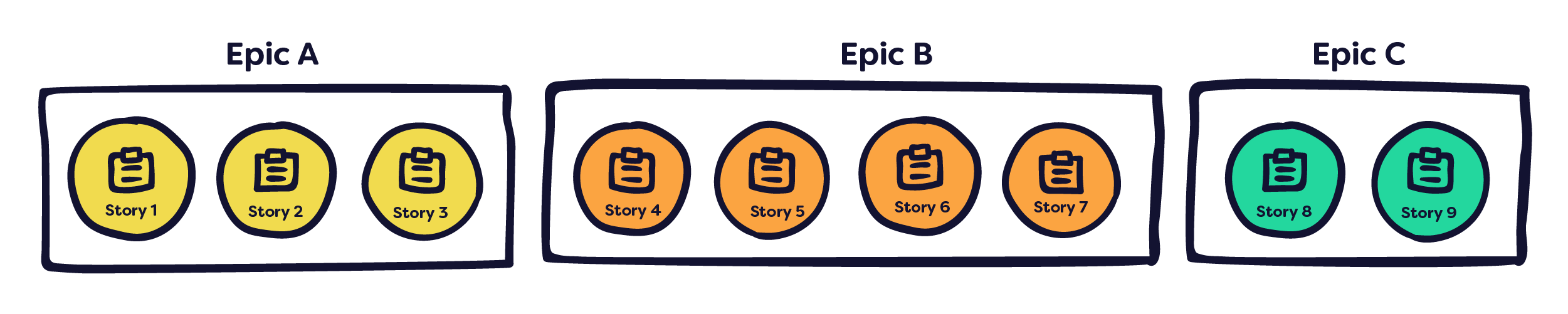
When it comes to the development phase, your backlog is critical as it will ultimately inform what is contained in the milestones and iterations that follow.
2. An extension identification spreadsheet
Extensions are a core component of CodeBots and can be utilised in your application, representing patterns of functionality which are often repeated across different software products. Extensions available on CodeBots, the key here is to recognise where a particular extension can cover one of your own business patterns or requirements.
3. Prototypes
During the scoping phase, you should find yourself generating a series of prototypes to help validate your idea and ideate on improved solutions. Whilst rapid prototyping allows your team to quickly try and test new things, more polished prototypes are also necessary when it comes to conducting high-quality testing. Not only are these suitable for gathering user feedback, but they are also good for showing the team and stakeholders involved exactly how the product should look when complete.
4. An entity diagram
An entity diagram is a visual representation of the underlying database structure of your application.
When creating an application using CodeBots, you can utilise the Entity Diagram editor in the Platform to build this out, adding in any extensions where necessary. When you are ready, it's as simple as hitting the Build button to kick off development, and watch the bots work their magic!
5. Software estimations
Finally, software estimates can provide valuable insights into your project before starting development. As part of our own Way of Working, we have developed a tried and tested method in How do you calculate the length of a software project?. Armed with your estimates, you will be best equipped to set realistic expectations among the different stakeholders involved in your project.
Discover More

Bring Your Own Keys to ChatStudio and Keep Control
ChatStudio BYOK lets teams use the AI providers their organisation already approves, discover models directly from those providers, and calibrate execution without giving up control.

ChatStudio is Here
ChatStudio is now part of the CodeBots platform, giving teams a governed way to turn structured intent into execution, capture meaningful outcomes, and lay the groundwork for self-improving AI delivery.
How AI Can Get It Right
Better prompts help, but they are not the whole answer. This article explores how teams improve AI reliability with retrieval, context management, structured workflows, and stronger sources of truth.